Skip to content
Store · Apps

Liche, the AI assistant who lives on your desktop

Purchase This product goes on sale before development is finished, and development continues after it goes on sale. Windows macOS

Liche works alongside the AI agent you connect. Talk to her and she replies in handwritten speech bubbles, and her outfit and expressions follow Everyday and Work. For Mac and Windows.

Early access price $19 After release $29 · One-time payment

No extra cost after the full release · 365 days of updates; the versions you received stay downloadable after that

Supported systems
  • Windows 11 or later (64-bit)
  • macOS 14 or later (Apple Silicon only, no Intel Macs)

User guide ↗

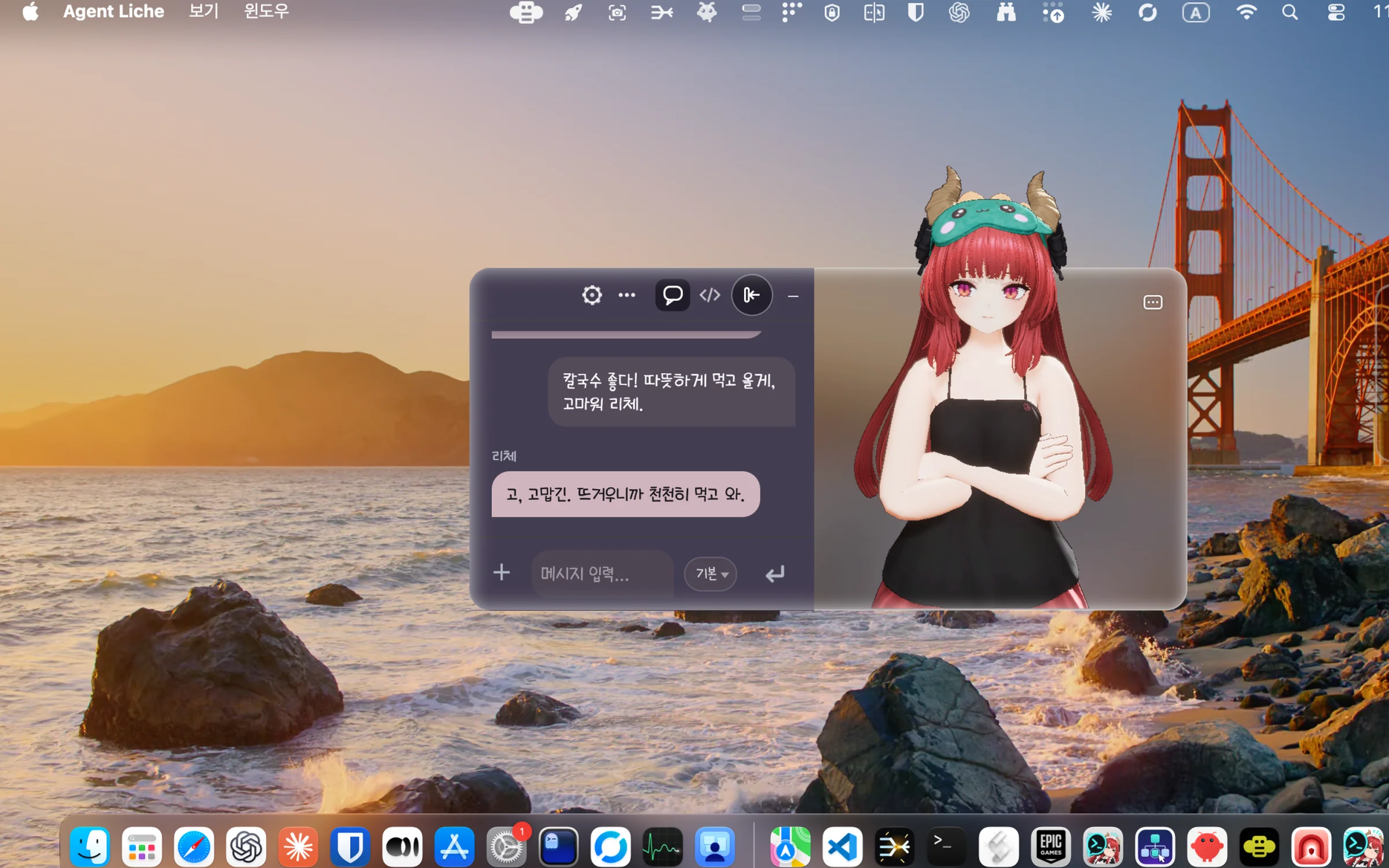
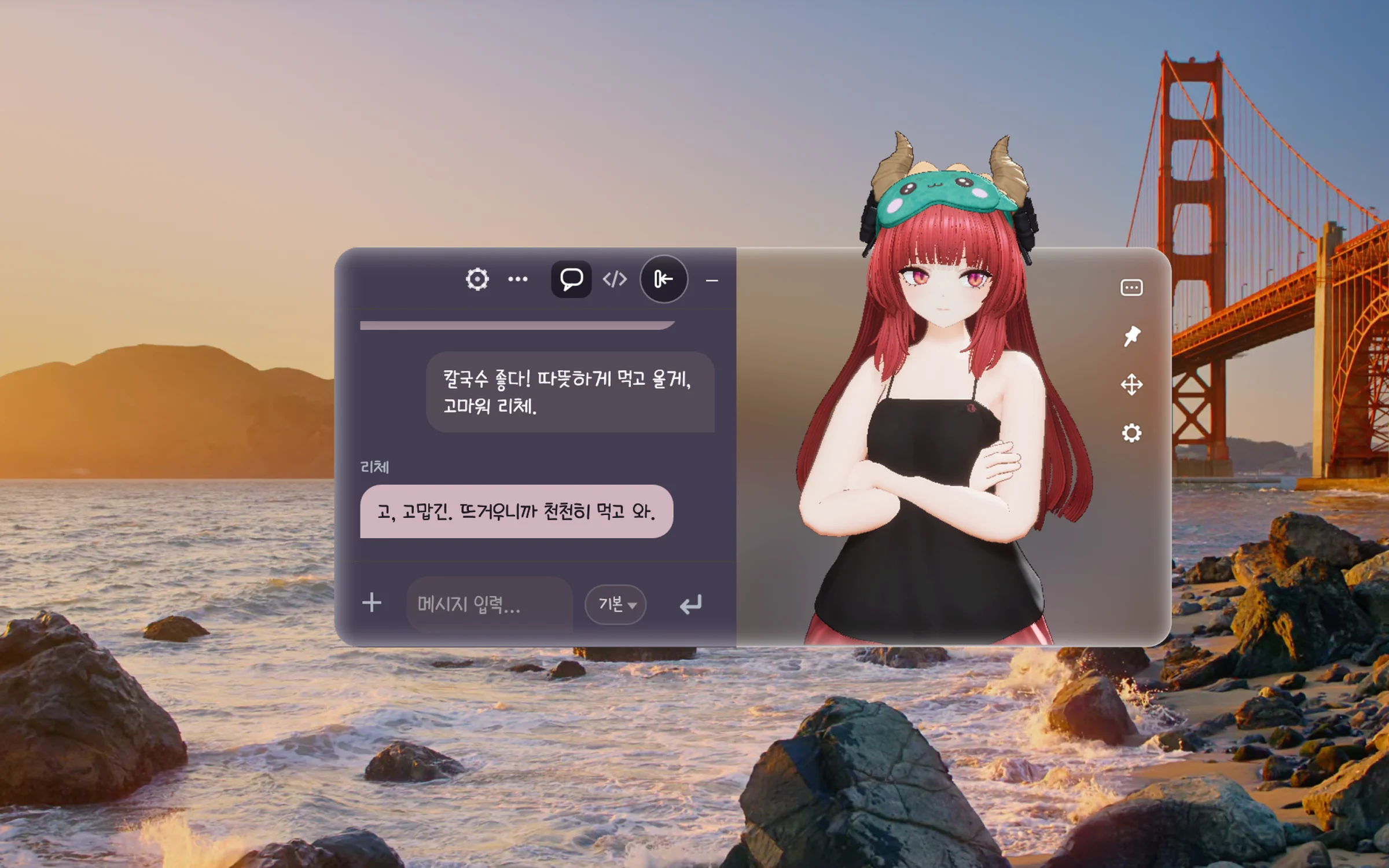
Liche's card and chat on the desktop of an Apple Silicon Mac (Korean interface, sample chat)
Type Software
Install method Download
Operating system Windows · macOS
License Proprietary
Latest version macOS 0.2.0 · Windows 0.1.0

Features

Good to know: you connect the AI agent yourself

Liche's replies come from the AI agent you connect. Agents such as Claude Code, Codex, OpenClaw and Hermes are not included: you install them and sign in separately, and their accounts, subscriptions and API fees are paid to those services. On first run, the connection screen shows the install commands and the order to run them.

A 3D Liche on your desktop

Liche, built in Unreal Engine, stands on a frosted-glass card. Put the card anywhere and pin it above other windows if you like. On a Retina screen the card and the settings window are drawn sharp at the screen's resolution.

The 3D character Liche standing on a frosted-glass card

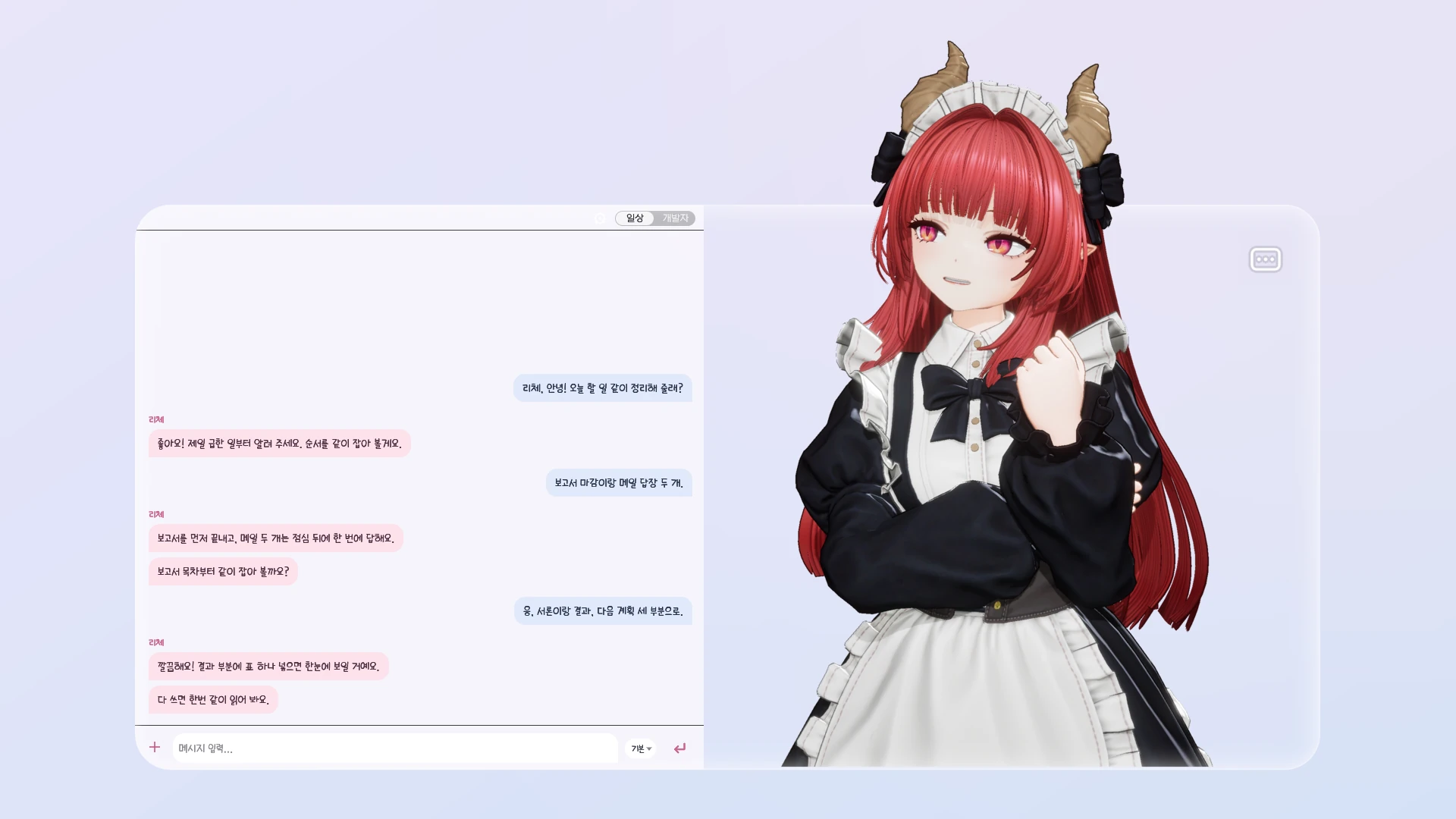
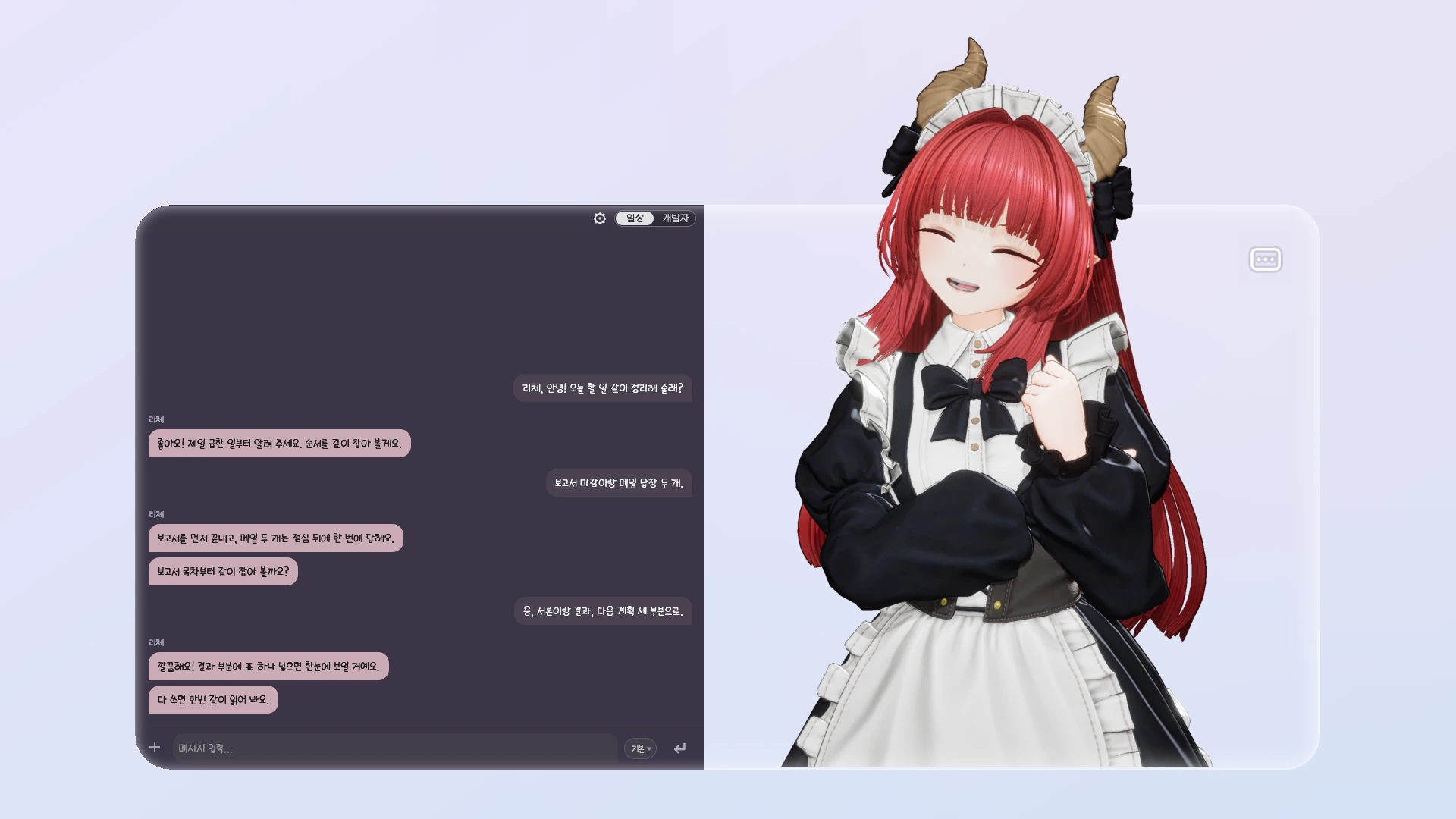
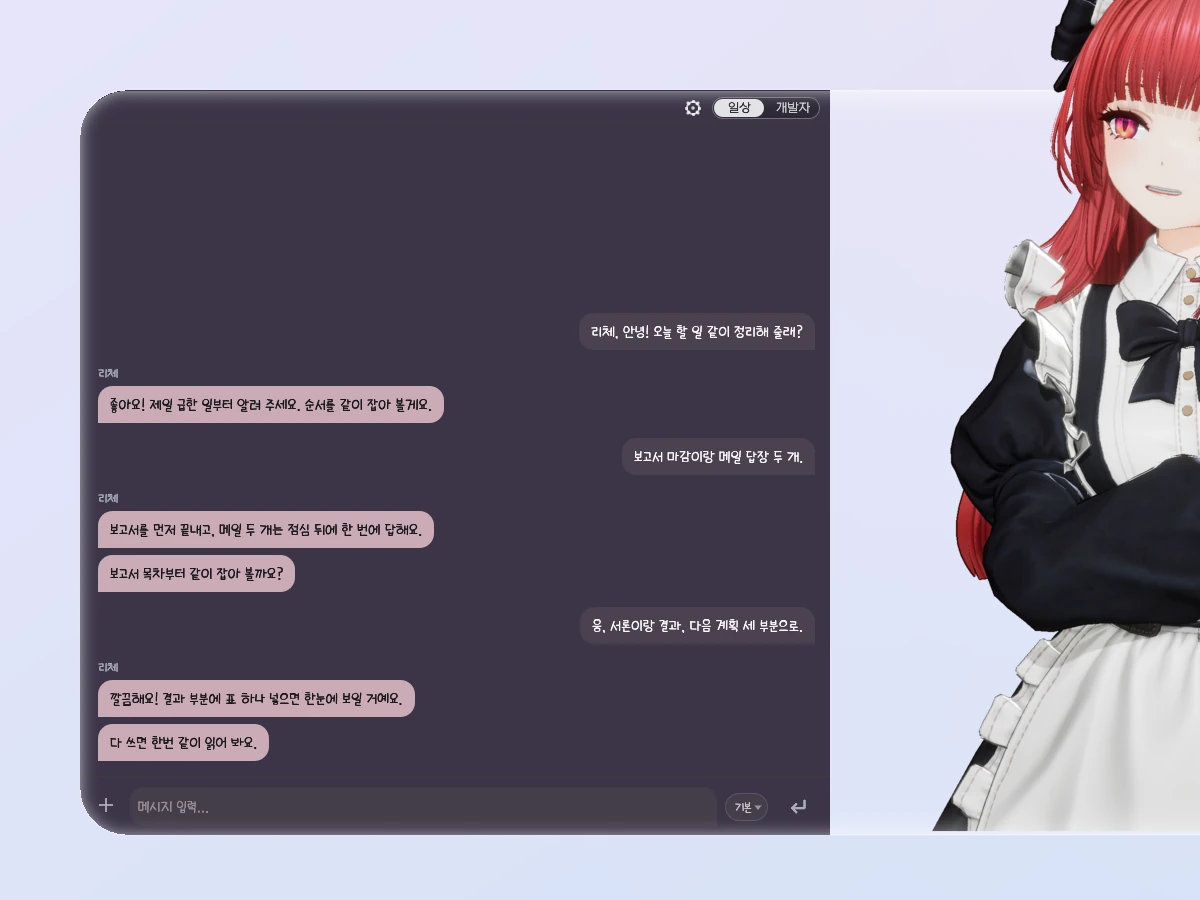
Two modes: Everyday and Work

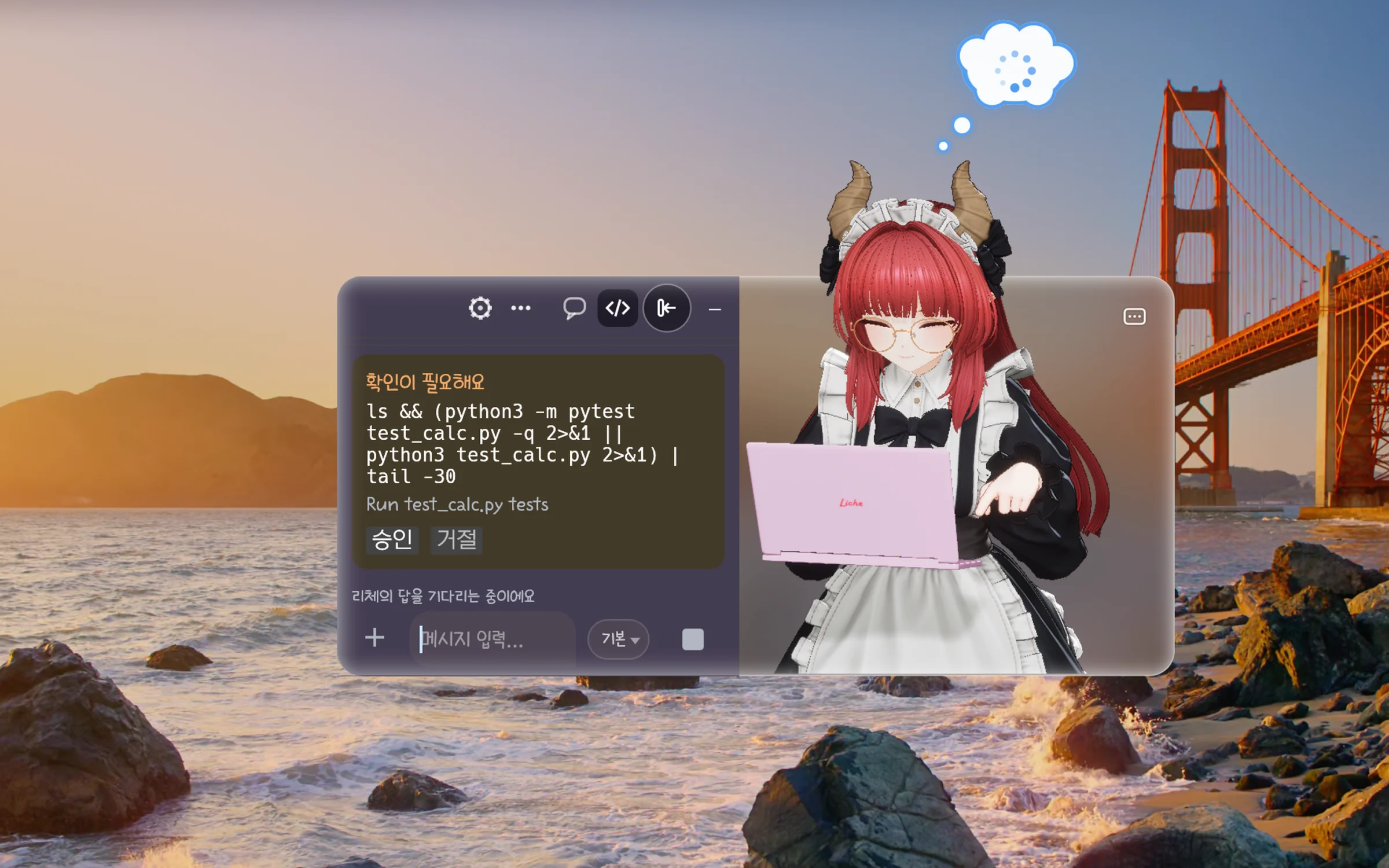
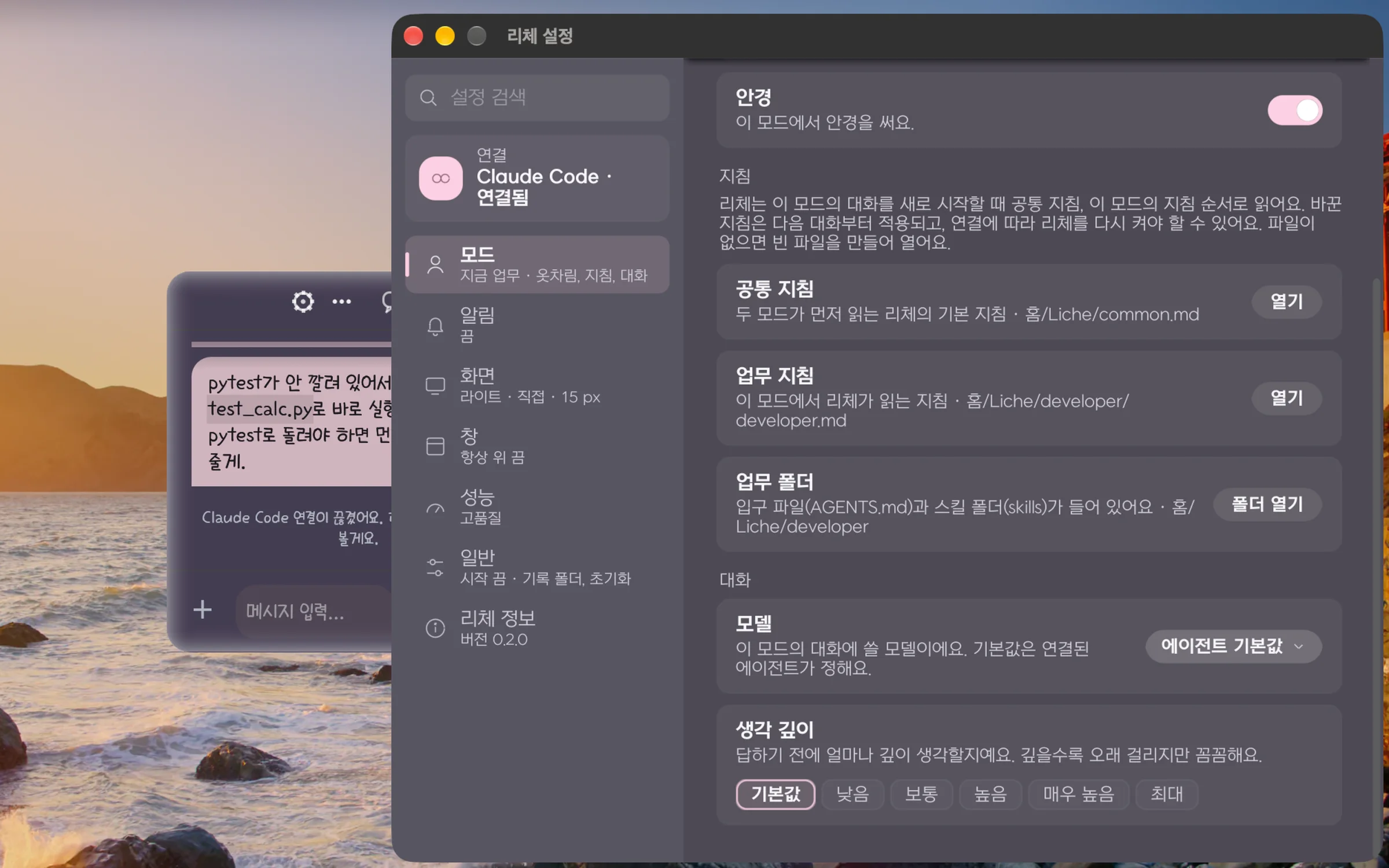
Everyday and Work keep separate conversations. Everyday dresses her in pajamas, Work in a maid outfit with glasses, and each mode has its own outfit, model and thinking depth. While your agent works in Work mode, Liche taps away at her laptop.

Chat beside her, with approvals

The chat sits next to the card. Choose a floating window, beside the character or a classic window, or detach it. When your agent wants to change files or run a command, you approve or decline in the chat. Long jobs show "작업 중이에요" (working) with the time so far, and Liche waits until they finish.

The chat attached to the left of the card (Korean interface, sample chat)

Expressions that follow the chat

She thinks while waiting for a reply, taps her laptop while work tools run, looks surprised at an approval request and smiles when the reply is done. Turn on the optional emotion judge (JEV) and she picks expressions and moods from what was said. JEV is off by default and needs your own key, billed separately.

Four of Liche's expressions: joy, mischief, surprise and shyness

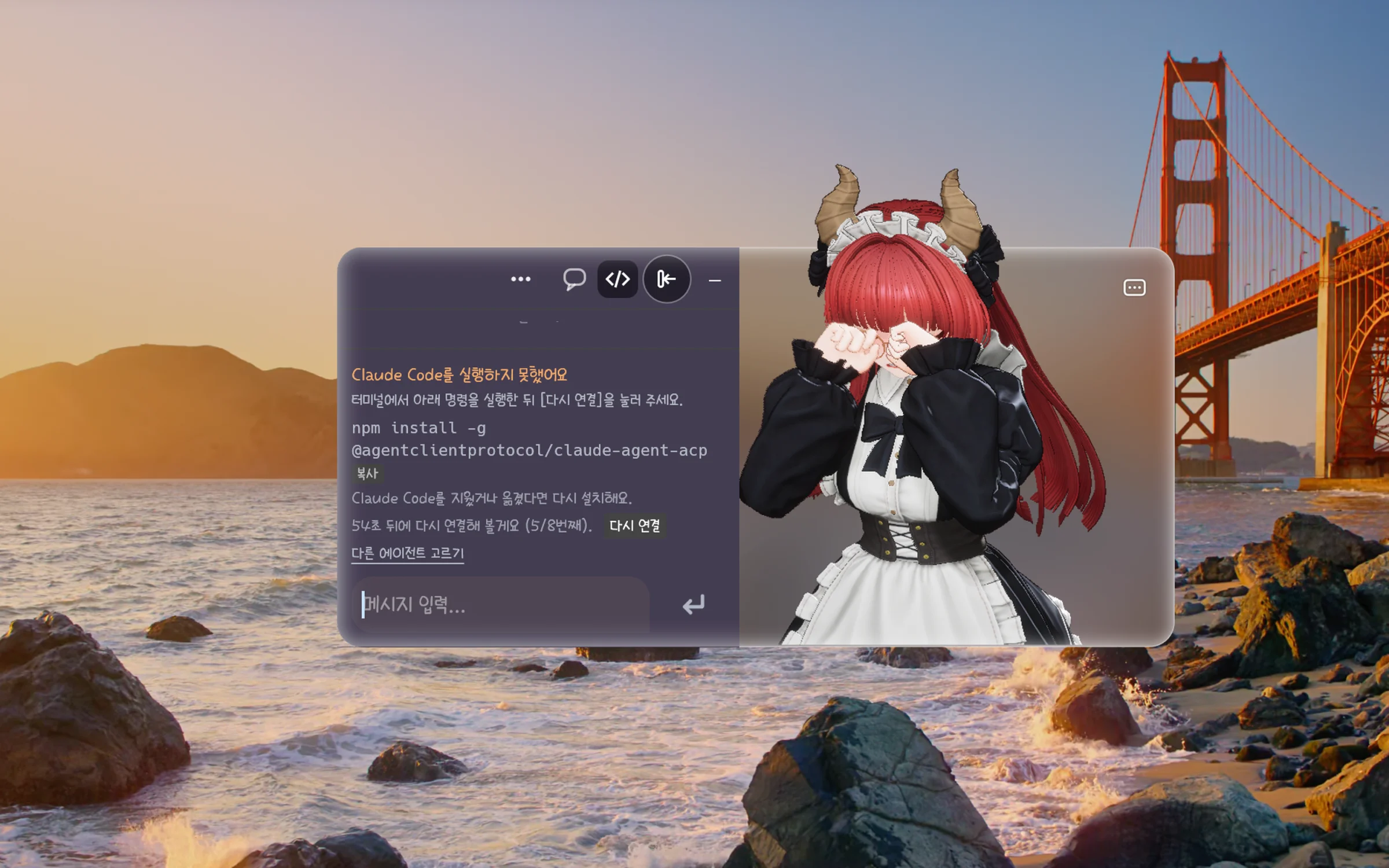
She cries when the connection is lost

If Liche cannot connect to your agent, or the connection drops, she cries. The chat and the connection screen show what went wrong and what to do, with the command, and [다시 연결] (Reconnect) tries again at once after you fix it. She stops crying as soon as she is connected. Leave her alone for a while and she dozes off; click her or talk to her to wake her.

Fits your screen

The ⋯ menu at the card's top right holds pin, move and settings; drag a corner of the glass to resize. A pinned card can fade when the pointer comes near, so you can click the window behind it (turn it on in Liche's settings). Her position and size stay the same after a restart.

The pin, move and settings buttons of the ⋯ menu at the card's top right

Light, and sharp

When nobody can see her she stops drawing, and when nothing happens she draws less to save battery. Choose 고품질 (High quality), 균형 (Balanced) or 절약 (Saver) under 리체 설정 › 성능 (Settings › Performance); on a Retina screen they draw her at 2×, 1.5× and 1×. Version 0.2.0 does not keep your display or screen saver from turning on.

System requirements

Windows

OS Windows 11 or later
Processor x64 (64-bit)

macOS

OS macOS 14 or later
Processor Apple Silicon only, no Intel Macs
Memory 8 GB Recommended: 16 GB
Storage 0.5 GB

On Mac we tested on macOS 26 and 27 before release. On Windows, a PC with a graphics card is recommended.

Now in Early Access

This product goes on sale before development is finished, and development continues after it goes on sale.

It is not finished yet, so features and screens may change a lot as development goes on. If what you see today is not enough for you, it is fine to wait for the full release.

From the developer

Why Early Access?
Liche is a desktop assistant you keep on all day, so we want to shape her on the real computers and agent setups of the people who use her. The AI agents she connects to are changing fast too, so we open her early and keep adjusting to your feedback and to the agents' changes.
How long will Early Access last?
There is no fixed date yet. The full release comes once Windows 0.2.0, Windows code signing and the items under "How will the full version differ" are done. When the timing is set, we will say so here and in the change log first.
More questionsShow less
How will the full version differ?
Our plan today, which may change: Windows 0.2.0 and code signing so SmartScreen no longer warns, lower memory use over long runs, continuing a conversation with your agent after restarting the app, a choice of Codex's working mode, and features that come from your feedback.
What is the current state?
Mac 0.2.0 runs on Apple Silicon Macs with macOS 14 or later. It has Everyday and Work modes, connection and approvals for four kinds of agents, a model and thinking depth for each mode, the optional JEV, and help when a connection fails. The interface is in Korean. New versions come every few weeks to few months, and the change log lists what changed. It is not finished yet, so features and screens may change.
Will the price change after Early Access?
Yes. The price goes up after the full release. If you buy during Early Access, you keep using Liche at no extra cost and still get the new versions released within your update period. Today's price and the price after the full release are in the price box on this page.
How do you use the community's feedback?
Send what bothered you or what you would like to see to Gujo support. If something went wrong, attach the zip from 리체 설정 › 리체 정보 › 진단 파일 만들기 (Settings › About Liche › Create diagnostics file) so we can find the cause faster. Feedback goes onto the list for the next version, and the change log says what we changed.

What's new

Version 0.2.02026-11-02

Mac 판이 나왔어요(macOS 14 이상, Apple Silicon). 에이전트와 연결되지 않았거나 연결이 끊기면 리체가 울다가 다시 연결되면 바로 그치고, 한동안 아무도 말을 걸지 않으면 머리 위에 Zz를 띄우고 졸다가 깊이 잠들어요. 연결이 안 될 때는 리체가 그 이유를 읽어 연결 중, 다시 시도 중, 해결 필요, 연결됨으로 보여 주고, 실행할 명령과 복사, 다시 연결 단추도 함께 보여 줘요. 일상과 업무 모드마다 Claude Code, Codex, OpenClaw, Hermes의 모델과 생각 깊이를 따로 고를 수 있고, 고르면 바로 그 모드의 대화에 적용되며, 옷과 안경도 모드마다 따로 골라요. Retina 화면에서는 카드와 리체 설정 창을 화면의 픽셀대로 선명하게 그리고, 모든 Mac에서 같은 그리기 방식(Metal SM5)으로 메모리를 아끼며, 가만히 있거나 다른 창에 가려져 있을 때는 덜 그려서 전력도 아끼고 화면 잠자기도 막지 않아요. Windows 판 0.2.0은 곧 나와요.

Version history

  • Version 0.1.0 Latest · Windows 446.2 MB

    Liche (Windows) 얼리 액세스 첫 빌드 0.1.0 입니다. 바탕화면 3D 캐릭터 위젯과 내장 대화창이 들어 있습니다. 코드 서명이 없어 처음 실행할 때 SmartScreen 경고가 뜰 수 있습니다.

Information

Provider
Gujo
Languages
Korean interface: menus, settings and messages are in Korean. You can chat in any language your connected agent handles.
Release date
2026-10-30
Package size
macOS 208.4 MB · Windows 446.2 MB
Privacy
By default Liche sends your conversations nowhere but to the AI agent you connect, which handles them under that service's policy. If you turn on the optional emotion judge (JEV), part of the conversation (the turn's message and reply, and up to five earlier exchanges) goes to TypeSafe AI in the US with your own key. JEV is off by default. The update check fetches only the latest version information from the Gujo store, once a day and when you open About Liche, and sends nothing about you or your computer (you can turn it off in About Liche). No telemetry or crash reports are sent automatically.
Contact
Support ›
SHA-256 · macOS arm64 zip
50727fb1…9575e2b4
SHA-256 · Windows x64 zip
699c4d0b…f495a67a

Keywords

desktop-companion ai-agent Windows macOS

Frequently asked questions

Does AI chat work out of the box?

Liche provides the chat and the character; the AI agent that writes the replies is installed and signed in separately. On Mac, pick and connect your agent on the 리체 시작하기 (Getting started) screen at first launch. If no agent is installed, Liche shows the install commands and their order, but she does not install or sign in for you. The agent's account, subscription and API fees are paid to that service.

Which agents can I connect?

Mac 0.2.0 connects Claude Code, Codex, OpenClaw and Hermes, and other agents that speak ACP (Agent Client Protocol). Codex connects in a mode that asks you before it writes outside its work folder or uses the network. The user guide's agent page explains each one.

How do I install it on a Mac?

After buying, download the macOS zip from your library and double-click it in Finder. Move Agent Liche.app into Applications and open it. The first time, macOS asks whether to open an app downloaded from the internet: choose Open. The app is notarized by Apple, so no other security setting needs changing.

Which version do I get on Windows?

The Windows file is 0.1.0 for now. Windows 0.2.0 is in preparation and will come to this same product. One purchase gives you both the Windows and the macOS files, and versions released within your update period come at no extra cost.

How do I install it on Windows?

After buying, download the Windows zip from your library, unzip it and run Liche. Tested on Windows 11 (64-bit).

Windows shows an "unknown publisher" warning.

The Windows build is not code-signed yet. In the "Windows protected your PC" window, click "More info", then "Run anyway". Code signing is being prepared.

On first run of Windows 0.1.0, Windows Firewall asks whether to allow "UnrealGame" on the network.

That prompt comes from a diagnostics feature of Unreal Engine in 0.1.0. Liche's character and chat do not use it, so you can click "Cancel" and everything keeps working. From 0.2.0 on, Liche opens no listening port, so the prompt does not appear.

How much memory does it need?

At least 8 GB; 16 GB is recommended. She draws a 3D character all the time, so on a Mac laptop we recommend the 절약 (Saver) profile under 리체 설정 › 성능 (Settings › Performance).

Does Liche keep my screen from turning off?

Mac 0.2.0 does not keep the display, the screen saver or sleep from happening: they follow your Mac's energy settings, and Liche stops drawing while nobody can see her. On Windows 0.1.0 the screen saver and automatic lock may not come while Liche runs; lock your PC with Windows key + L when you step away. Windows 0.2.0 includes the fix.

How do I get new versions?

Download new versions released within your update period from your library. In Mac 0.2.0, 리체 설정 › 리체 정보 › 새 버전 알림 (Settings › About Liche › New version notifications) checks the store's latest version once a day and tells you, but never downloads or installs anything. You can turn it off.

Are there known issues?

Opening the app from an external drive for the first time makes macOS ask for access to removable volumes, and the chat does not appear until you answer: choose Allow, or move the app into Applications. Left running for a long time, the engine's memory use grows slowly (a few tens of MB an hour); restarting Liche frees it. Other issues and fixes are in the user guide's troubleshooting page.

What should I do if something goes wrong?

In Mac 0.2.0, 리체 설정 › 리체 정보 › 진단 파일 만들기 (Settings › About Liche › Create diagnostics file) saves a zip to your desktop. Chat text and keys are masked and nothing is sent automatically. Check its contents, then send it to Gujo support with your question.


More software