One Gujo Apps subscription gives you this app and every other subscription app. See plans ›
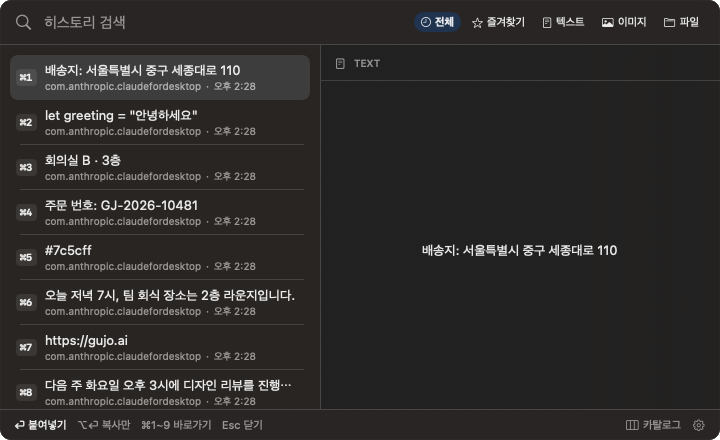
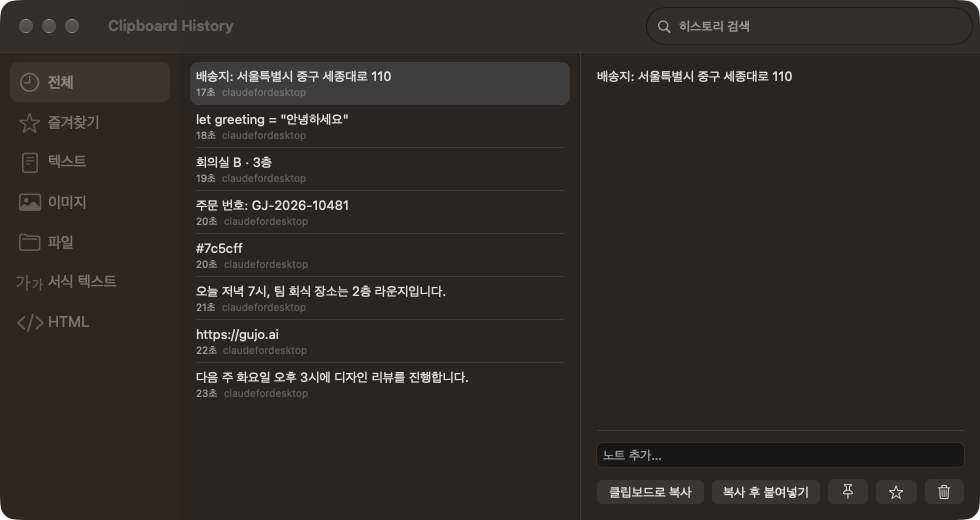
The quick window opened with ⌥⌘VFilters, list, and preview in one window
RequiresmacOS15.0 or later
PlatformmacOS
LanguageKO · EN
Size10.4 MB
Clipboard History keeps a running list of what you copy on your Mac: plain text, rich text, HTML, images, and file lists copied in Finder. Copying the same thing twice in a row keeps a single entry.
A history window on a shortcut
Press ⌥⌘V in any app and the history window opens next to your pointer. Type to search, press Return, and the item is pasted into the app you were using. The app stays out of the Dock and the menu bar; you open it with this shortcut, which you can change in Settings.
How to use it
Open the window: Press ⌥⌘V to open the quick history window. Press it again or press Esc to close it. Press ⌘O or click Catalog to open the full window with filters, the list, and a preview side by side.
Search: The search field is ready as soon as the window opens. Type the start of a word to find it in copied text and in your notes. Use the All, Favorites, Text, Image, and Files filters to narrow the list.
Paste: Pick an item with the arrow keys and press Return to paste it into the previous app. ⌥Return copies without pasting, and ⌘1 to ⌘9 paste the first nine items. In the full window, double-click an item to paste it.
Pin: Right-click an item and choose Pin, or click the pin button in the preview, to keep it at the top of the list.
Favorites: Items you mark as Favorite are collected under the Favorites filter.
Notes and deleting: In the full window, add a note to any item from the preview; notes are searchable too. Delete an item from the right-click menu or with the trash button.
Automatic cleanup
Items that are neither pinned nor favorited are kept up to the latest 1,000, and older ones are removed automatically. Pinned and favorite items are always kept.
Your history stays on this Mac
Everything you copy is stored only on this Mac. Clipboard History does not sync your history to iCloud or to other devices, and an item you delete is removed from this Mac right away.
Sensitive items stay out
Anything copied while 1Password, Bitwarden, KeePassXC, Keychain Access, or Passwords is in use, and anything a password manager marks as private, is not saved. Text that looks like a private key, an AWS access key, a GitHub, GitLab, Slack, Stripe, OpenAI, Anthropic, or Google API key, or a JWT is also skipped automatically.
Requirements
Runs on Apple Silicon Macs with macOS 15 or later. It is included in the Gujo Apps subscription: sign in with a subscribed Gujo account and install it from your Gujo Cloud Apps library. The app is available in English and Korean.


 Keyboard Settings Manager
 RightClick